> For AI agents: the complete documentation index is available at https://nhanbe.id.vn/llms.txt, the full documentation bundle is available at https://nhanbe.id.vn/llms-full.txt.
# Use Author CSS
## 1. Cách làm chuẩn nhất (AEM Best Practice)
:::tip Insight
- **Nguyên tắc vàng của AEM:** Các class như `.cq-Editable-dom`, `.cq-Editable-dom--container`, `.cq-placeholder` chỉ tồn tại trong Touch UI Editor (`wcmmode=edit`). Chúng hoàn toàn không tồn tại trên trang Publish (`wcmmode=disabled`).
- **Tại sao không nên viết vào `_carousel.scss` (clientlib-site):** Nếu viết vào SCSS của ui.frontend, đoạn CSS override authoring này sẽ bị đóng gói vào `clientlib-site.css` — tải về cho 100% người dùng cuối (end-users), làm bẩn CSS production và ảnh hưởng Dispatcher cache.
- **Cách chuẩn AEM Architect:** Tạo một Authoring Clientlib riêng biệt với category `cq.authoring.page` (ClientLib này chỉ được AEM nạp khi mở trang trong Editor `editor.html`, không bao giờ nạp ở trang Publish).
:::
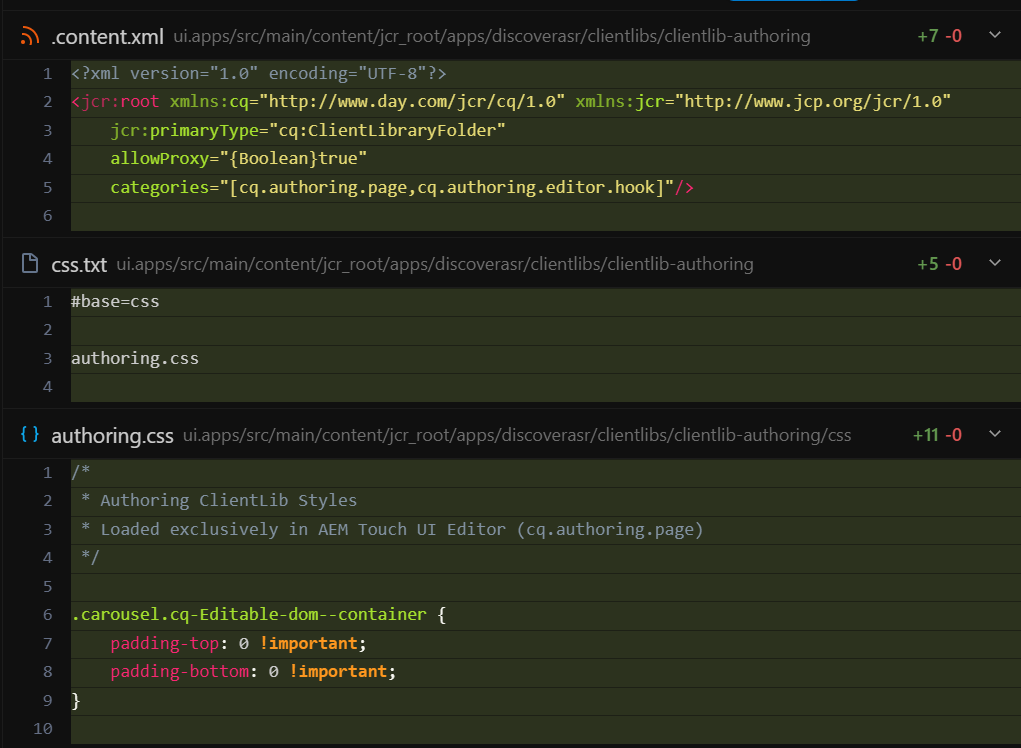
Trong project mysite, cấu hình chuẩn này đã có sẵn tại:
`ui.apps/src/main/content/jcr_root/apps/mysite/clientlibs/clientlib-authoring`
### File .content.xml
```xml title=".content.xml"
```
### File css/authoring.css
```css title="css/authoring.css"
/*
* Authoring ClientLib Styles
* Loaded exclusively in AEM Touch UI Editor (cq.authoring.page)
*/
.carousel.cq-Editable-dom--container {
padding-top: 0 !important;
padding-bottom: 0 !important;
}
```
***
## 2. Làm cách nào để style padding-top: 1.25rem bị gạch ngang
Trong trình duyệt (DevTools), một thuộc tính CSS sẽ bị gạch ngang khi:
1. Có một selector khác khớp vào cùng element đó.
2. Selector đó định nghĩa lại cùng thuộc tính (`padding-top`).
3. Selector đó có độ ưu tiên cao hơn hoặc có cờ `!important`.
### Selector chính xác để đè bẹp rule của Adobe
Rule gốc của Adobe trong `/libs/.../internal/page.css`:
```css
.cq-Editable-dom--container, .cq-Editable-dom--container.[*] {
padding-top: 1.25rem;
padding-bottom: 1.25rem;
}
```
Để đè và làm nó bị gạch ngang, bạn có 2 cách viết selector:
:::tabs
### Cách dùng !important (khuyên dùng)
Khuyên dùng trong `authoring.css` để chắc chắn 100%:
```css
.carousel.cq-Editable-dom--container {
padding-top: 0 !important;
padding-bottom: 0 !important;
}
```
### Cách không dùng !important
Tăng độ đặc hiệu (Specificity):
```css
.cq-Editable-dom--container.aem-GridColumn.carousel {
padding-top: 0;
padding-bottom: 0;
}
```
Specificity của selector này là `(0, 3, 0)`, cao hơn `(0, 2, 0)` của Adobe nên tự động đè gạch ngang không cần `!important`.
:::
***
## 3. Tại sao trang của bạn hiện tại chưa thấy bị gạch ngang?
Qua kiểm tra trực tiếp trên instance AEM của bạn:
1. Node `clientlib-authoring` đã được nạp vào trang qua thẻ:
```html
```
2. Sau khi hard reload lại trang trong Editor, DevTools hiển thị:
- `padding-top`: từ `20px` (1.25rem) → `0px`
- Rule của Adobe `.cq-Editable-dom--container` bị gạch ngang
:::info
Nếu trên trình duyệt của bạn vẫn chưa thấy gạch ngang, hãy truy cập trực tiếp vào:
`http://localhost:4502/editor.html/content/mysite/us/en/offers/page-1.html`
Và bấm `Ctrl + F5` (Hard Reload) để xóa cache của iframe `#ContentFrame`.
:::